

I had a customer pose a challenge to me recently… they are using VMC on AWS for DR, with Site Recovery. Based on the size of the recovery environment, and the number of users (3000+) that will need access to the environment during a DR exercise, they have deployed (2) SDDCs – one for the replication and recovered server workloads, and a second for the VDI instances (they are using Horizon). So one of their requirements is to ensure the desktops in the ‘production’ DR pool can get access to the ‘production’ DR server workloads during an actual DR event. They also would like to be able to test DR as well, of course, and for this purpose they have a small pool of ‘test’ desktops that need to access the ‘test’ server workloads during a DR test. For the benefit of both users and administrators, they desire a separate pool of desktops that have a different desktop background, with different colors, etc, so that users know when they are in a ‘test’ environment and when they are in the ‘prod’ environment. For obvious reasons, they also can not allow the test and prod environments to mix in any way – they do not wish to corrupt or disrupt production in any way. So their requirements are as follows:
DR testing
- server workloads are recovered into an isolated network environment
- server workloads must be recovered with same IP addresses as production
- it is assumed for failover testing production is still live, therefore it is expected networks will NOT be ‘live’ in VMC, but isolated in some way
- server workloads must have connectivity to each other
- server workloads and networks must not be able to conflict with/disrupt / interrupt production workloads in any way
- desktops must be available for testing recovered ‘test’ servers
- desktops must only be allowed to connect to the recovered test servers – never production
DR failover event
- server workloads are recovered into an connected network environment
- server workloads must be recovered with same IP addresses as production
- it is assumed for failover production is down, therefore it is expected networks will be live in VMC
- server workloads must have connectivity to each other
- desktops must be available for testing recovered servers
- desktops must only be allowed to connect to the live recovered servers – never the test environment
Their questions revolved all around connectivity from the ‘test’ desktops to the ‘test’ servers, and the ‘prod’ desktops to the ‘prod’ recovered workloads. This customer chose to recreate all their production workload network segments in the cloud, rather than using HCX to stretch networks… however if they chose to use HCX to provide the connectivity services, I don’t believe it would have changed any of the other requirements, or the solution. See the attached diagram for the environment they had already built.
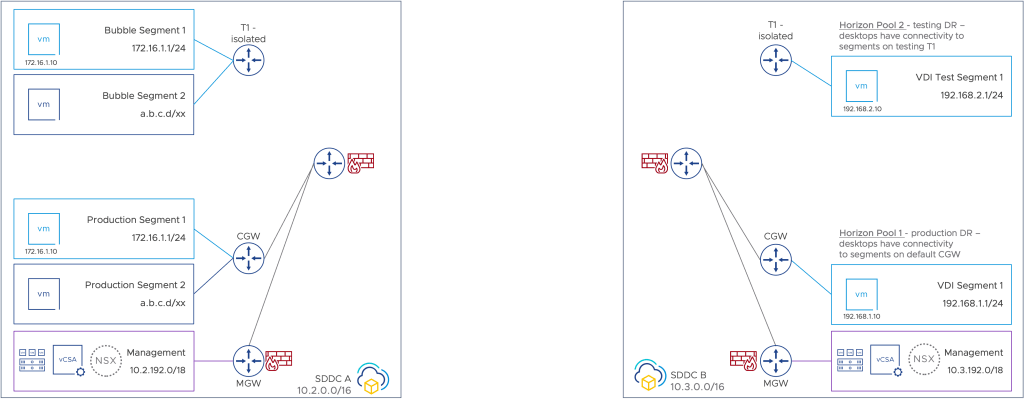
After talking it through with them, and discussing it with some team members internally a bit, we came up with the following solution… grouping the two SDDCs with a SDDC Group to connect them – this will provide high-speed access for production desktops to the recovered workloads during a failover event.
For the testing connectivity, one of two options…
Option 1 – T1 Policy VPN
Create a T1 policy VPN to connect the test desktops running behind their isolated T1 – see attached diagram.
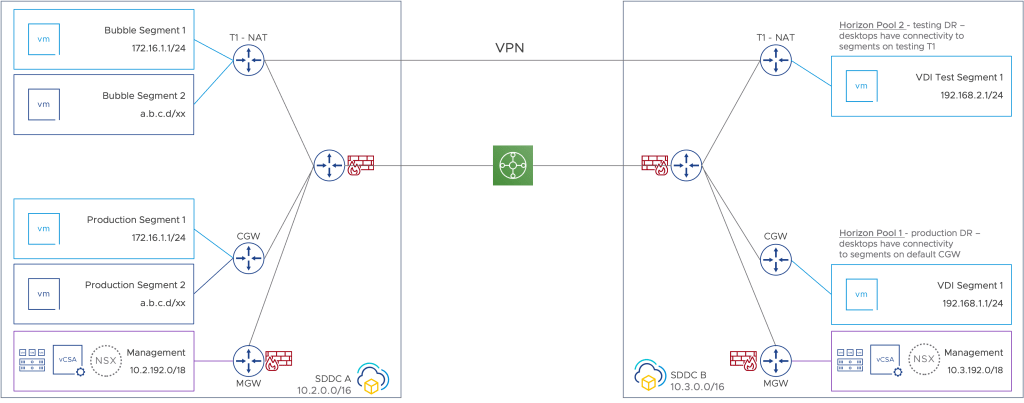
The process for building a T1 policy VPN between the two NAT T1 Gateways is found here: https://vmc.techzone.vmware.com/understanding-vpn-customer-created-nsx-t1s-vmc-aws
Option 2 – HCX Stretched Network
Create a HCX stretched network between the test server segment(s) to the isolated VDI environment – see attached diagram… the important detail here is the VDI segment must be created in the server SDDC, and then stretched into the VDI SDDC.

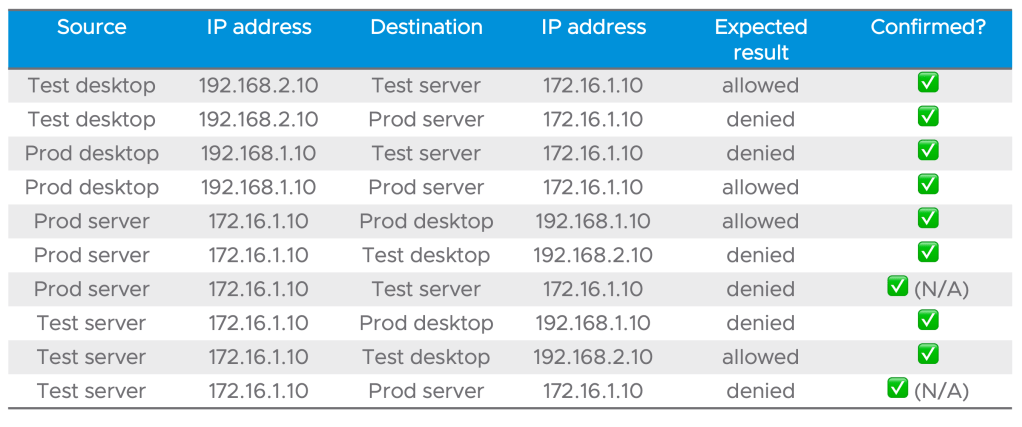
I ran all the required connectivity tests –
Access to Horizon Desktops
The only remaining item was how to actually connect to the Horizon instances… building off the initial diagram, it is easy enough to add the necessary Horizon infrastructure to illustrate how the connection servers and UAG servers might be added to the solution:
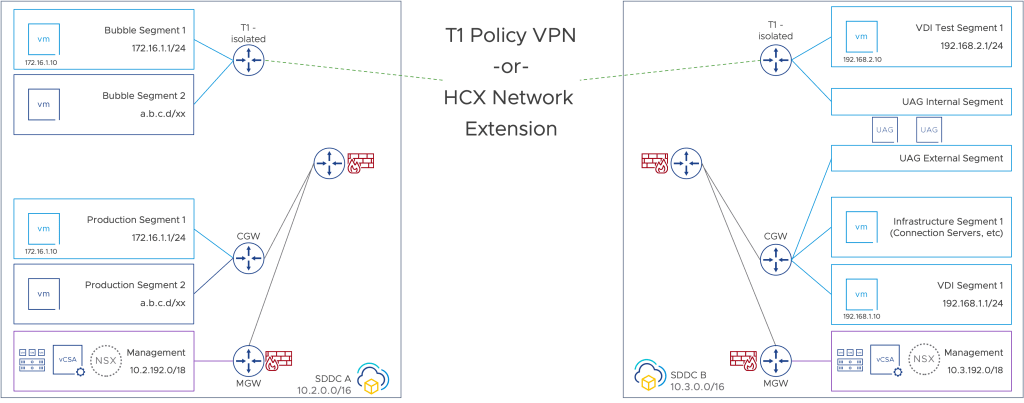
Add some public IP addresses and NAT rules for the UAG servers, and users should be able to connect to the test desktop pool. You could easily extend this for a second set of UAG servers for the ‘production’ desktops instances.
Happy computing!
 My Occasional IT Blog...